Version
Release Date
Release Details
v11.5.0.2
24th November 2014
Applies to MineBack Ultimate only:
- Correct Tooltip for %apppath% setting.
- Fixed bug which prevented closing application if a backup failed.
v11.5.0.0 (rolled up together with v11.1.1.8, v11.1.1.1 and v11.0.0.1)
22rd December 2013
Applies to MineBack Ultimate only:
Fixed bug preventing Shunt map augmentation, added shunt augmentation direction to Region Map Level.
Fixed coordinate system bug (forgot about X, Z, Y and coded some functions X,Y,Z leading to obvious issues).
v11.1.1.1 (rolled up together with v11.1.1.0)
17th October 2013
Applies to MineBack Ultimate only:
Resolved Windows XP issue when attempting to open Save folder from MineCraft:
Unable to cast COM object of type 'System.__ComObject' to interface type 'Shell32.Shell'. This operation failed because the QueryInterface call on the COM component for the interface with IID '{866738B9-6CF2-4DE8-8767-F794EBE74F4E}' failed due to the following error: No such interface supported (Exception from HRESULT: 0x80004002 (E_NOINTERFACE)).
Resolved issue when first entering the Settings Screen on new system:
Object reference not set to an instance of an object.
v11.1.1.1 (rolled up together with v11.1.1.0)
17th October 2013
Applies to MineBack Ultimate only:
Added the Fishing rod enchantments (as recognised enchantments):
Lure of the Sea and
Draw
Thanks to PG for letting me know :D.
v11.1.1.0
17th August 2013
Applies to MineBack Ultimate only:
Changed 'Add Mob' to use Floats for Rotational coordinates instead
of double values (I believe that MineCraft went through this change also?).
Added Export to XML feature for NBT files.
Added Import XML feature
Added confirm box on closing editor when changes are outstanding
Fixed bug with dirty Detection .
Updated health reset to reset using the attributes (e.g. generic.maxHealth)
Improved NBT editor with visual feedback for invalid field entries.
v11.1.0.2
17th August 2013
Applies to MineBack Ultimate only:
- Added: Potion Names
Updated the Inventory editor to correctly name potions. All
potion inventory items use a single item data code. The type
of the potion is determined by the items Damage field (another
MineCraft bad programming / no-design classic) and the
damage value defines what potion you will get.
- Added: Entity Type Tag
In versions of MineBack Ultimate prior to v11.1.0.2 in order to
discover the type of entity it was necessary to expand the entity
item and inspect the ID tag. In new version of MineBack Ultimate
the type of the entity is summarised against the container.
To put that another way, new field for quick inspection of items
and mob types in NBT editor without needing to expand each branch.
- Updated: Block and Item Codes
Added the following as recognised block/item types (respectively):
- Activator Rail
- Blaze Powder
- Blaze Rod
- Book and Quill
- Bottle o' Enchanting
- Brewing Stand
- Carrot (Ordinary and Golden)
- Carrot on a Stick
- Cauldron
- Daylight Sensor
- Diamond Horse Armour
- Dragon Egg
- Dropper
- Emerald
- Empty Map
- Enchanted Book
- End Portal
- Eye of Ender
- Fire Charge
- Firework (Rocket and Star)
- Flower Pot
- Ghast Tear
- Glass Bottle
- Glistering Melon
- Gold Horse Armour
- Gold Nugget
- Hopper
- Huge Brown Mushroom
- Huge Red Mushroom
- Iron Horse Armour
- Item Frame
- Lead
- Magma Cream
- Melon Slice
- MineCart with (TNT, Hopper)
- Mob head
- Name Tag
- Nether (Brick and Quartz)
- Nether Quartz Ore
- Nether Star
- Nether Wart
- Potato (Normal, Baked and Poisonous)
- Potions
- Pumpkin Pie
- Quartz Block / Stairs
- Redstone Block
- Redstone Comparitor
- Spawn Egg
- Spider Eye (Normal and Fermented)
- Stained Clay
- Trapped Chest
- Wall Sign
- Weighted Pressure Plates (Light and Heavy)
- Written Book
Finally, added all 12 records :).
- Added: Inventory Initialisation Menu
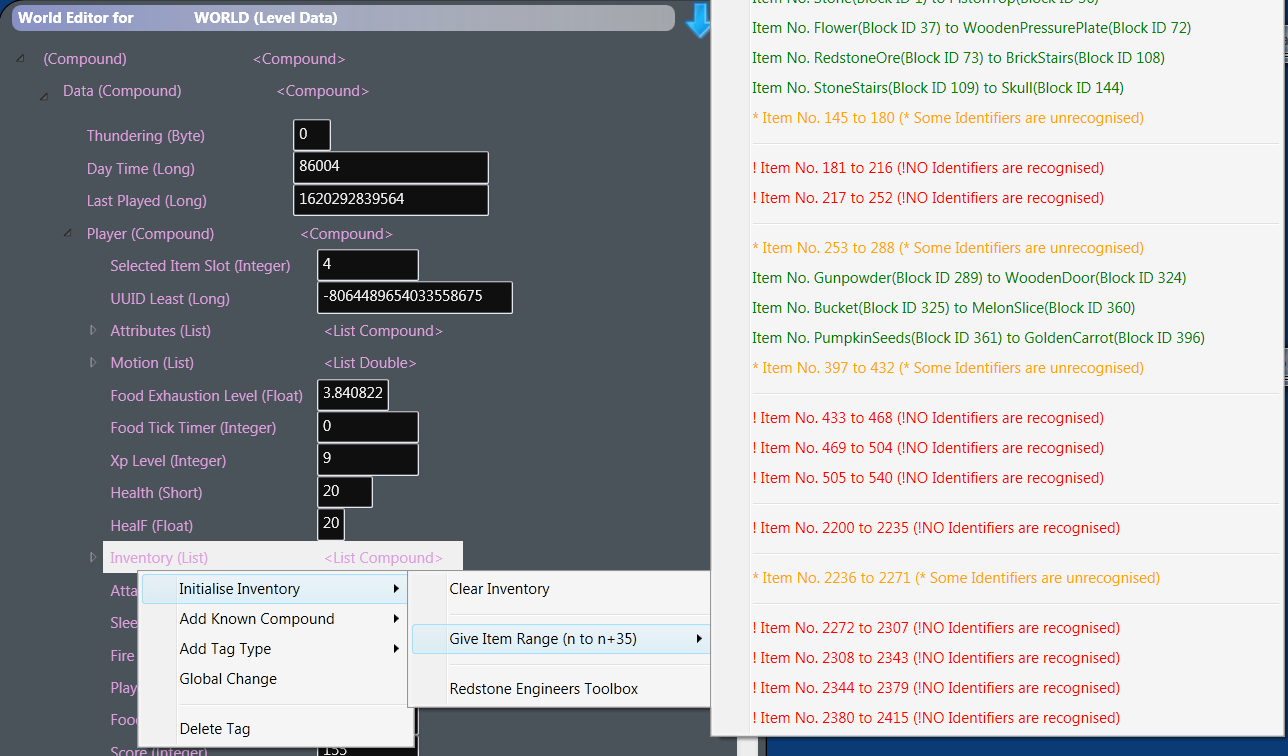
When using the Level Data editor (aka "Edit (Level Properties)"),
right clicking on the "Inventory" compound will produce a new menu
(pictured here:
).
I have added three ways to initialise the inventory:
- Clear Inventory
This simply clears the entire player inventory
- Give Item Range
Initialise and setup the inventory with a
range of items using their data codes (item
identifiers).
I wished to have a way of checking I had accounted
for all the possible items a player might acquire in
the game, so I added these options primarily for
testing but figured anyone might enjoy experimenting
with them.
I've colour coded the menus to help. Menu items
appearing in red include no valid items in MineCraft
version 1.6.2. Ones coded in orange have at least
one valid item to be given (as of version 1.6.2)
and entries coloured green will fill the inventory
will valid items. As MineCraft evolves, and new
item identifiers are used what these menus give you
may change (which is where the interest lies).
- Give Potion Range
Since there are more potions than inventory space, I've split
the give potions into the following groups:
- Connoisseur (Drinks Cabinet)
This option give you all the Named Potions with 'No Effects'.
These potions are purely for vanity (though a bottle of
water is always welcome ;)).
- Novice (Backpack)
This option gives 64 of each of the basic potions along with their
time extended variants.
- Master (Supply Cupboard)
This option gives you 64 of all the time extended and level II
potions.
- Splash Master (Party Supplies)
This option gives all the splash variants of the
'Master (Supply Cupboard)' potions.
- Redstone Engineers Toolbox
I wanted to make some redstone circuits but was tired
of scrabbling about for all the components in creative
mode and organising my inventory in survival so I
have added this option which replaces the players
inventory with all the redstone related components.
v5.0.0.1 and v11.1.0.1
11th August 2013
Applies to MineBack Free, Ultimate and Professional:
- Added: Option to cull only certain backup types
MineBack now allows you to choose what type of backups you wish to cull. You
can select between culling Automatic and Manual backups only (or any backup).
Thanks to ChodaBoy for this great suggestion.
Applies to MineBack Ultimate and Professional only:
- Added: Backup Age Column
This column will give the age of the backup in the lowest number of
units. So, for example, if the backup is less than a day it will give
the age in minutes and if its less than a year old but more than a month
it will give the age in months. Handy for helping to choose the right cull
period.
- Fixed: Cross section map rendering
I have finally the fixed the problem with the map renderer not rendering chunk map cross section view(s).
Applies to MineBack Free only:
- Improved: World backup list is refreshed after Cull.
v5.0.0.0
3rd August 2013
Applies to MineBack Free:
- Added: Automatic Backup Disabled Warning
For new users it was easy to accidentally untick the Automatic Backup checkbox
and not notice backups where not being taken. Now, if Automatic backup
is not enabled the window title will say "Backup Disabled" and the
main interface background will pulse red.
- Improved: Backup list automatic refresh
The backup list will keep itself up to date as backups are
made. Previously, the list only refreshed when a world was
selected or the F5 key was pressed. Thanks ChodaBoy for
pointing this out.
- Fixed: World Name Reading
Updated the simplified level data parser (separate from
the powerful parser found in MineBack Ultimate) to
recognise the newer tag types (e.g. World Name parsing
from level data working in MineBack Free again).
v11.0.0.0
13th July 2013
Applies to MineBack Ultimate:
- Added: Launcher command line options
Since the release of 1.6.2 (or possibly before as I've been very busy lately)
there is a new standard MineCraft front end (main launcher).
This launcher's reported purpose is for game version management, and
it does have some features around this *.
I have added a drop down selector on the settings page where you
may choose how you wish to launch MineCraft. I've added presets for
the following launch commands:
- 1.6.5 Java Direct Launch (default)
This is the command line the current standard MineCraft launcher ultimately uses to launch the game.
- Java Direct via MincCraft.jar
This is the older launch command used by prior versions of MineCraft.
- Java Direct via Game Executable
This is the older launch command but it uses the MineCraft executable version.
- Standard MineCraft Launcher
This will execute the standard launcher in the same way you would by double clicking on MineCraft.
As always you can entirely customise any of these commands to suit you, and you can
add your own variants to the drop down list. To further enhance the launcher
the new command lines allow the use of MineCraft specific variable values
(which work like Environment Variables), for example to specify using the
MineCraft data store folder use the variable %datapath%. There are a number of
variable values you can use, I have noted next to each setting what its
variable value is in square brackets.
The new distribution mechanism of MineCraft passes the Java library files as parameters
into the Java runtime. I've enhanced the MineBack launcher to automatically gather
the required information and pass it to the launcher.
* My personal view is that
this new launcher is there for two reasons, firstly its to try to combat
the spate of 'alternate' launcher providers who have been behaving
massively unethically and providing an alternate avenue to MineCraft
which goes against the interests of MoJang (so I can sympathise on that
front) but secondly its been used as a opportunity to force MineCraft
users into a more profitable usage footing for MoJang by forcing them
to go online at start-up (there's no option not to have this! Whilst
you may play offline, the only way to truly play offline is to block
the launcher or turn off your internet. Something I am very much less
happy about, because I feel its forcing their customers.
To me customers are a privilege not something exploited (a view I will
never change, even if it does mean I stay not well off lol).
- Improved: Initial loading time for people with many worlds
In versions of MineBack Ultimate prior to version 11 the world list loading was performed synchronously on
start-up. This generally worked well for up to 10 worlds. However, now
I have over 30 worlds (including test and scratch worlds) I was beginning to be a little slow ;).
Now the UI will appear first and the worlds list will load after that.
- Corrected: Hideous misspelling of the word configuration
Configurtion.. sounds like a robot name ;). hehe.
- Updated: Reset Health Level
A new field was added for recording health, it appears the lowest value of the two
fields is used to determine the current player health. I have added the
new field to the health reset operation.
v10.5.0.2
28th March 2013
Applies to MineBack Ultimate:
- Added: Setting to disable Window auto-sizing
MineBack Ultimate automatically resizes its windows to fit within the
available desktop area. I had a report of multi-monitor issues running
MineBack Ultimate. I have not run into problems myself but allowing the
autosizing to be disabled will allow the user to size forms as
required without restriction.
- Bug Fix: Eliminated pre-load delay when rendering low-populated regions
When rendering the world map, in order for the map Window to remain (even
slightly) responsive, it is necessary to slow the rendering to allow the user
interface thread to keep up. It appears to be a minor design flaw of WPF,
that there is no simple method which allows asynchronous update of bitmaps
being displayed by controls (at this time).
- To be fixed: Cross Section Map not Rendering (agg! again >.<)
Sorry about this. I double checked map editing and this bug is not effecting that. I
will investigate why the Cross Section map view is no longer working next week
(as sadly I have not got much free time).
v10.5.0.1
27th Feb 2013
Critical Release, Bug Fix and Improvements. Applies to MineBack Ultimate:
- FIXED: Restoring from archive failed with version 10.5.0.0
This is a critical bug fix. Anyone using v10.0.0.5 please update as soon as possible!
NOTE: Your backups made using 10.0.0.5 will be correct. It was only the restore process that
was effected.
- Fixed: Closing MineBack during the backup process caused error
This did not pose a serious issue but resulted in an error dialog.
- Corrected: Automatic Addition of Mod Related Files
When toggling this option, the mod related files where no longer added / removed from
the list in real time. This has been corrected.
- Improved: Handling of invalid file names
Added code to more elegantly handle the
Windows-invalid filenames inside MineCraft.jar
- Improved: Handling of META-INF
Added code to neatly handle the META-INF folder.
v10.5.0.0
22nd Feb 2013
Mod'ing Update
Improvements. Applies to MineBack Ultimate:
- Added: Modding Helper Utilities
I have added a set of utility functions to aid modders
in managing the MineCraft.jar update process. The toolset
allows you to:
- Extract MineCraft.jar (Prepares for Changes)
- Presents the MineCraft Files for modification in Explorer (Graphics, Sound, Text Files, Java Bytecode files etc)
- Updates MineCraft.jar using your changes (Applies Changes)
- Provides an option to revert to the original MineCraft.jar (Undo Changes)
To perform
a modification (for example to change the game fonts)
you can click the 'Extract MineCraft.jar' which will
extract the content of the MineCraft.jar (game core)
into a file system folder then open the folder for you
in Windows Explorer. You may then modify / replace any and
all files you wish to (e.g. open the \font folder
and update / replace default.png with your modified font)
and then click 'Update MineCraft.jar' to apply your changes
to the game (as always with any modification to the game,
please make sure you are not running any copy of MineCraft
before beginning). Please further note, all modifications
will be unsupported by MoJang and I do not take any
responsibility for any damage you might do to your game
(though obviously, correct use of the backup process will
protect you from most possible issues that may be caused).
PLEASE NOTE: decompilation of the java class bytecodes is
beyond the scope of this project. If you wish to make code
modifications to MineCraft you will also need to acquire the
appropriate Java Decompiler and toolsets (which may be used
in conjunction with MineBack and its Modding Helper tools).
MineBack is not a replacement for a good mod-loader utility,
but is a great companion tool for any mod-loader.
In this authors observations (since I did decide to look for
a good quality commercial Java Decompiler to consider licensing
for MineBack use before arriving at my decision of this being out of
scope) authors of Java Decompilation utilities appear to be largely
on the shady side (not providing contact details, location or
professional credentials which would always make me think twice
and look else-where) I therefore recommend you are very
cautious when selecting a decompiler (and be sure to use an
up to date anti-virus solution). To give the benefit of the
doubt, it is possible that the potential illegality of decompilation
necessitates this based on regional laws. However, Notch originally
stated that he was not against those with sufficient knowledge
decompiling the code base (a very realistic view point that has
won him many devotees). Please remember though to check in with
the licence terms for the
game to make sure what your considering is legal and allowed.
- Improved: Archive Backup Process
In previous versions of MineBack (Professional and Ultimate)
the archive process was performed synchronously. This was fine
for the majority of worlds. However, for very large worlds long
delays during the backup archive process where unacceptable.
Now the archiving process runs asynchronously on a separate
thread that re-synchronises with the UI thread for progress
updates.
- Fixed: Archiving Issue
When attempting to backup an empty Superflat world it
was possible for MineBack to quit or hang. This wouldn't
effect 99% of users because it did not effect automatic
backup and normally a world does not remain so small for
any significant length of time (running 5 blocks in any
direction is enough).
Background:
There is clear indication that Microsoft do not wish
developers to have the same level of access or indeed
a professional level of access to system utilities in
an easy to use and reliable fashion. This is evidenced
in many ways, but none more clearly than when coding for
simple shell operations. To keep this story short,
it is not possible to reliably track the progress of
Windows Compressed Folders without a level of effort
which is entirely disproportionate to the amount of benefit
and reward obtained. Secondly, the level of performance
given to any non Microsoft application is far inferior
to the level of performance obtained by default from the
Windows shell (for example). These factors have required
me to make some pretty unsatisfactory workarounds to achieve
what is required and gain the benefit of built in operations.
Since (due to this) there is no simple way to detect when a
shell compression action has completed it has
been necessary to use workarounds checking on the
file content. In previous versions (as a simple and
quick indicator) a minimum file size for compressed
files was assumed based on an empty world. As MineCraft
has been improved, the storage required for a world
has gone down, especially for the new Superflat world
type. I have updated the code to account for this fact
now but the honest truth is I should never, ever have had
to account for it in the first place!
v10.1.2.0
16th Feb 2013
Improvement. Applies to MineBack Ultimate and Professional:
- Added: World Detail Summary Page
There is a lot of interesting and useful meta-data held with each world.
I decided to add a summary document panel which gathers the
meta data and presents a text based overview of each world,
information includes:
- General Properties (World Name, Game Mode, File Name, Spawn Coordinates etc)
- Environmental Summary (Time, Weather etc)
- Installed Mod Summary (FML/unofficial)
- Improved: Updated time changing so as not to reset the total days played counter
When the MineCraft time system was updated a new DayTime value was added along side Time.
In my first version of the time set code (Day, Night, Morning etc) there was
only ever a single effective day. The updated code will still reset the effective time
of day not but will not reset the total days passed.
- Improved: Improved User Interface Layout
The main user interface now intelligently resizes as the user adjust
the window pane proportions; This allows the window to be sizes with
few restrictions and still maintain useful readability. The main window
dimensions and the pane sizes (set by dragging gripper bars) are saved with
the other user preferences.
v10.1.1.3
9th February 2013
Improvement. Applies to MineBack Ultimate:
- Added: End Cascading Event
Using this new command you can end, explosion chain reactions,
collapsing sand sculptures, lava eruptions, flooding and
fire. The idea behind the command to stop the spread of the
damage.
- Added: Optional Mirror Backup
Recently one of MineBack's users was unfortunate and had a their
HDD unit fail. I considered this situation and felt that I could
add further optional backup redundancy into MineBack by adding
the option to 'Mirror' all backups to a secondary / external drive.
So, I have added a new option on the settings page 'Mirror Backup'
which (when set to any folder) will make a duplicates of all
future backups at the location specified as well as in the primary
backup folder. I have set mine to copy backups onto my Flash Drive
so should my primary device fail for any reason I will still have
backups on the secondary device.
- Fixed: Corrected bug that could cause chunk changes not to be saved after a region augmentation
When MineBack was checking to see if a chunk in a region needed
rebuilding it was inspecting the dirty flag against the chunk
data before hand (to avoid redundant NBT rebuilds). Unfortunately,
I only checked the outermost dirty flag and did not perform a
recursive dirty test each chunk. This meant that sometimes an
augmentation would complete correctly but not all of the chunk
updates would be saved. This did not cause any map problems but
could lead to inconsistent results (for example one chunk not
changing). It went unnoticed because for most chunk augmentations
the changes effect the entire chunk so the outermost dirty flag
is usually set (so worked as expected). This only seriously
effected the Mob Clearing code (previously leaving some chunks
containing mobs; Corrected)
v10.1.1.2
24th January 2013
Improvements. Applies to MineBack Ultimate and Professional:
- Added: File / Folder Exclusion Lists (including wildcards)
I have added an additional list of files and folders,
any file or folder added to this list will not be
included in any backups (will be excluded from backup)
whilst remaining in the exclusion list! It is also
possible to add wildcards to this list (so, for example
if you wanted you could exclude all the locking files
*.lock from future backups).
- Added: Open World Save folder / Backup Folder in Windows Explorer
To accompany the addition of file exclusions, I have added context menu shortcuts to open
world save folder and the backup folder in Windows Explorer. Right
click on the world or backup and choose the Open in Windows Explorer option.
This is already proving handy if you just want to grab some single file from
an old backup rather than restore the entire backup.
- Fixed: Browse for folder mangled folder name by removing last slash =(
Sorry, I didn't notice this bug because it doesn't effect me directly
and only effects when adding or removing additional files, exclusions
or browsing for folders. Which isn't often required. This has
been resolved, my apologies to anyone this has frustrated.
Bug Fix. Applies to MineBack Ultimate Only:
- Fixed: Very silly bug with loading arbitrary NBT files
The fact is, I forgot the call to actually load the file. I setup all the data
and then jumped straight to displaying the interface which of
course reported quite correctly "failed to load" for any file.
Still, it was never a core feature lol. Backups have never failed
and that is the goal.
v10.1.0.9
23rd January 2013
Improvements. Applies to MineBack Ultimate:
- Added: Quick choice alternate Save and Backup Folders
Since I've been playing MineCraft for a long time now, I have a large number of worlds
and I don't always want to be concerned with every world. I didn't want to just ignore
those worlds either. So, I moved some worlds into different locations and would copy
them back and forth to the main MineCraft folder. This proved tedious if I decided
I wanted to change world sets a lot, so I have added direct support for alternate
world save paths and alternate backup paths with a combo box to quick change
between sets.
- Adding MobSpawner and Setting Type: Added ability to simply add Mob Spawners of any type
I've updated the "Add Known Compound" menu to allow adding to "TileEntities" (which is what holds the type of the MobSpawner)
and further added another menu when right clicking on "TileEntites" entry to add a mob
spawner of a specific type. Once added you can tweak the parameters as desired.
I've further added a new "Mob" drop down in the editing window. If you select a
mob then paint a Monster Spawner (Mob Spawner) it will quickly create a spawner
of that type in that location. Similarly, if you remove a mob spawner its
mob type information will be removed also.
- Improved Tool Tip Display: Added X, Z and Y markers against coordinates in tooltips
I sometimes forget, having followed MineCraft development from the early days that not everyone is aware of the Z, X, Y
ordering chosen by Notch.
- Improved: Improved error handling for MineCraft process locked Map Chunks
In previous versions, if you try editing a map running in MineCraft you
would be warned but allowed to continue. If you then opened
a chunk locked for updating by MineCraft you would receive
load errors and a malformed editing window. In this version
and forward, if Map Editing cannot occur for a chunk, a
single visually pleasing notification will appear.
- Workaround: Added code to work around .NET 4.0 bug in Windows 8
The error received is a UCEERR_RENDERTHREADFAILURE and it
occurred when map rendering was in progress or had been completed
and the MaxHeight value of the form was adjusted to ANY VALUE.
My previous attempt to fix the Windows 8 crash issue, was only
partially successful (it transpired, thanks again Chris for letting
me know it was still an issue). I think this time I have found a
way to avoid triggering the bug (although it means the map editor
is will no longer 'smart size'). I found
the following thread
which details the cause. From what I can gather changing any aspect
of the sizing specifics of the map window during or after map
rendering caused the render thread to enter a race condition bug.
leading to an unrecoverable application crash. I hope this workaround
will see this bug off once and for all. Its irritating Microsoft's
comments to the bug "fixed in .NET version 4.5" when .NET version
4.0 is still in its support cycle.
Next Release Plan
In the next release I plan to add backup exclusions requested by one of the registered users.
I wanted to release it in this set, but I am not sure how much additional work / testing
will be involved yet, so wanted to get these tasty treats out to everyone first.
v10.0.8.5
18th January 2013
Bug Fixes. Applies to MineBack Ultimate:
- Nether Editing: Fixed broken nether editing
Thanks for Chris and Brandon for pointing this one out. Whilst I was
looking into this, I found and corrected a few potential annoyances
with the way the augmentation works.
As a test I ran a block replacement augmentation on two nether regions
simultaneously. It all went "swimmingly" which is surely the right word to use
since I replaced the lava with water ;).
I would particularly like to thank Chris B for his really helpful approach
and for providing everything I needed to get things fixed as quickly as possible!
It's people such as yourself who help to make MineBack the best!
v10.0.8.0
17th January 2013
Bug Fixes. Applies to MineBack Ultimate and Professional:
- Windows 8 Fixes: Added Patch to avoid Windows 8 .NET Bug
After a two day slog, I've identified the Windows 8 problem. In versions of .NET prior
to Windows 8, if you set the MaxHeight value of a WPF form to be larger than available
screen space this does not cause any problems. In the Windows 8
release of WPF .NET setting the MaxHeight to larger that the
available space causes an exception to occur in the PresentationCore
module. This exception is not caught by and ignored in standard
WPF exception handlers! Repeated incorrect setting of this value leads
to application termination.. This was a nasty one to track down
without a copy of Windows 8.
- Bug Fix (applies to Windows 8): Fixed automatic Java Runtime Folder identification
MineBack searches for your Java install location based on registry settings
if you have installed only the 32bit Java client on a 64bit Windows operating system
MineBack failed to check the 32bit registry location. MineBack now
checks both locations.
v10.0.1.5
15th January 2013
Improved. Applies to MineBack Ultimate:
- Improved: Increased the error checking during map editing
There appears to be some Windows 8 specific map editing bug.
This issue is only effecting Windows 8 users. In an effort
to try to track this bug I have added additional (stronger)
error checking around the UI portion of the map editing.
v10.0.1.4
14th January 2013
Correction of load time Java Location prompter. Applies to MineBack Ultimate and Professional:
- Fixed: Startup 'Java runtime browse prompt' fixed
When launching MineBack; If MineBack failed to locate the Java Runtime
it attempts to prompt for you to provide its location. Due to
an oversight (my bad), this prompt attempts to display before
WPF is fully initialised and therefore fails to display. This
issue has been resolved! Much thanks to Matt for helping to identifying this issue!
v10.0.1.3
14th January 2013
Additional error handling around Java Runtime search code. Applies to MineBack Ultimate and Professional:
- Improved: Added additional check points to the Java Runtime search code
MineBack Ultimate and Professional attempt to automatically locate the Java Runtime
using the Java registry settings (with a final fallback of asking);
Since there have been many versions of Java there are multiple
different possibly ways to identify the runtime folder (varying
per version); MineBack tries each method to locate the Java runtime.
I have added code checks to each search method so, should there
be an unexpected failure (generally shouldn't happen) you will
receive an appropriately specific message.
v10.0.1.2
11th January 2013
Improved. Applies to MineBack Ultimate and Professional:
- Added: Ability to disable skinning (option to use your chosen Microsoft Windows Theme styling)
I won't personally be using this feature, but I can very much
understand those who do desire it. If you want your version
of MineBack to fit right in on your desktop and look alot like
all those other Microsoft applications, then this is the update for you.
To use the Microsoft Windows theme, click the 'Settings' button and tick the box
'Use Microsoft Windows Theme' couldn't be simpler!
- Added: Ability to turn off color coding
Further more; If you really, seriously, want MineBack to look exactly
the same. You can even turn off the backup/world colour coding and have
the list views look like they do in explorer.
Thanks for the feedback everyone.
v10.0.0.1
2nd January 2013
Bug Fix release. Applies to MineBack Professional and Ultimate:
- Bug Fix: Quick world-name-reading failed
When MineBack makes a world backup it has code which quickly
parses the world name from the level data. In versions
prior to 10.0.0.1 it was possible for the level.dat to grow
bigger than the quick parse buffer allowed for. This issue
has been resolved and now the quick parser allocates its
buffer dynamically in the same manor as the world editor.
I recommend that all registered users update. Thanks.
Happy New Year!
Aww, MineBack is 2 and a bit years old and all grown up. Cute ;).
v10.0.0.0
19th December 2012
Applies to MineBack Ultimate:
- New Feature: Game Mode Quick Changer
In prior versions of MineCraft the game mode could be easily switched by toggling just
one variable inside the level data file. So in the past this was easily accessible
from the 'Edit Level Data' world menu option. However, now there are several
places where settings need to be toggled to move into creative mode, so I have added
a menu option to toggle any world between creative and survival modes.
- Added: Enchantment Editing
Added specific support for editing enchantments on items in the player inventory.
To Enchant a previously unenchanted item. Right click on an Inventory compound entry
in the Level Data Editor (for any item) and on the popup menu choose, 'Add Known Compound' and then 'Add Enchantment Tag'.
To add Enchantments (either to an existing enchanted item or a newly enchanted item via the above method) expand
the 'Tag' entry under the item to Enchant and then right click on the 'Ench' child (compound list) and
choose 'Add Known Compound Type' again and then choose 'Add Enchantment'.
- Improved: Added Wool Colours to Map Rendering
I don't bother much with wool, but now anyone who does can see their map in all its colourful glory :).
- Update: Changing how setting the time of Day works.
It seems the MoJang team have altered how day and night works. It now appears
that Time (which used to effect time of day) is now used as a general time and
DayTime is used to track the time of day. I've updated accordingly.
- Update: Updated Item ID's to match latest release (All Change)
Updated MineBack Ultimate Block ID list so:
- Brick Slab becomes Piston
Added the following as recognised block types:
- Anvil
- Beacon
- Flowerpot
- Monster Egg
- Redstone Lantern
- Skull
- Tripwire Hook
- Wall
- Wooden Button
Also, added the block code to the drop down name in the editor.
- Fixed: Quick Map Editing
Switching quickly between map editing screens sometimes lead to application exceptions.
Greatly improved the stability of multi-tasking around map editing.
- Fixed: Naming Bug
Fixed a bug which occasionally caused a block name to be shown instead the enchantment name.
- Fixed: Cross Sectional Map Rendering
I must have broken the map cross-section view when I made changes to cache
the map load. I have now corrected this so the map renders correctly in all views.
- Fixed: Region Augmentation working again
This one caught me out in my testing! I had broken the Region augmentation but not the Chunk augmentation.
When I ran my tests all the Chunk augmentations passed correctly, which usually would mean that the region would
pass also (because its repeated Chunk augmentations). However, I didn't recall that
I had updated the code so that blocks at the chunk edge can have the same rules as ones in the middle,
in other words I forgot I added cross Chunk checks. This is what broke the region augmentation. It must
have been especially annoying / confusing for everyone as it ran through the process without error
message, but just didn't make any map changes =/. Sorry everyone. Good news is, its back now
and all working (its a bit slow though, but how often do you want to change every single Chunk in a region?).
v9.0.1.5
23rd June 2012
Applies to MineBack Ultimate and MineBack Professional:
- Improvement: UI/CPU Balance Option
After the CPU reduction update, I noticed that the trade off with reducing the CPU usage was
that the MineBack UI (specifically the time to backup progress bar) was much less responsive.
I prefer to have visual indicators that the backup progress is operational so made adjustments
but could not get a satisfactory UI / CPU usage trade-off.
Therefore, I've set the UI / CPU trade off to a sensible value, those who value less the
visual indicators can drag the slider to the right to minimise MineBack's CPU usage in
sacrificing regular visual updates. Those who do this will probably wish to also turn off
the archive backup option which will drain additional CPU during archive.
v9.0.1.4
16th June 2012
Applies to MineBack Ultimate and MineBack Professional:
- New Feature: Machine Migration Backup (Export and Import All).
I've been planning to do this for a while now, and Duckman33's request spurred me to get it completed.
Right clicking on the backup button gives you two options now, the
first performs the backup action on each world (see v8.2.1.4) the
second "Export All" collects together all the key files in your current
PC's MineCraft configuration (including the game executable) and archives
them ALL into a single file.
This file can then be simply restored to another machine running
MineBack (this makes it very straight forward to transfer your
settings between your laptop and your desktop PC).
To restore your settings, right click the restore button and choose
"Import All". Please be VERY careful using the restore option, you
will only be prompted once and once you have agreed all your
MineCraft files will be overwritten with the ones found in the
Export All archive.
- Fixed: Fixed bug causing unnecessary CPU usage when running.
Apologies to everyone for this an thanks to Marc for pointing this
issue out. MineBack Ultimate and Professional now runs mostly at less
than 1% usage. It seems I made a typing error whilst declaring a timer
so instead of it running once per second, it was running once per microsecond
=/ *ick*.
- Fixed: Fixed a very rare bug occasionally ZIP archiving to fail.
This error did not pose a problem as, if MineBack cannot complete, the ZIP backup it keeps the
folder based backup. It was a tricky one to track as in only happened occasionally.
v8.2.1.4
10th June 2012
Applies to MineBack Ultimate and MineBack Professional:
- Fixed: Fixed bug where sometimes World Name and World Folder became confused.
I didn't notice this until recently since mostly my world names and world folders matched up.
- Fixed: Fixed bug where backup was incorrectly flagged as having failed because MineBack tried to delete temporary files too early.
MineBack used Windows Compressed folders for its archive functionality. A limitation of the architecture Microsoft supply is that it is not immediately easy to determine when the background archive process completes. I have added some code to compensate which should have resolved this issue.
- Enhanced: Added additional backup menu, right click on the backup button for additional backup options.
I added a backup all option for Duckman33, the backup all option makes a backup of all worlds regardless of need for backup. I plan to also add a migration backup (backup all worlds and MineCraft to a single file for transfer to another PC).
v8.2.1.0
6st June 2012
Applies to MineBack Ultimate and MineBack Professional:
- Improved: Settings dialog now dynamically sizable to support any screen resolution.
Thanks to Duckman33 for letting me know there where accessibility problems on some screen resolutions :).
v8.2.0.2
31st May 2012
Applies to MineBack Ultimate:
- Fixed: Error when loading the second chunk of any map for editing.
Sorry about this strange error, I missed out a NULL condition check =/. Found this when my brother was using MineBack Ultimate to search villages.
v8.2.0.1
6th May 2012
Applies to MineBack Ultimate:
- Added: New settings tab to allow adding of any arbitrary files or folders to be included in the backup / restore process!
This one should prove popular with modders. I've even added a specific checkbox to automatically add MineCraft.jar into to the backup process.
The big advantage of this is that it ensures the backup is saved with the specific version of MineCraft running at the time the backup was made (ensuring backup may be always be played in future). This option is turned off by default.
- Improved: Changed the settings screen, grouping related settings under appropriately named tabs.
v8.0.1.6
30th April 2012
Applies to MineBack Ultimate:
- Fixed: Cull feature not functioning against Archive Backups.
The Cull feature has been updated to correctly recognise archive backups.
- Improved: Launcher will now intelligently choose between launching via the MineCraft executable and via the Java runtime (as configuration changes are made).
- Added: Automatically finds the install location of Java runtime environment.
Additionally it has come to my attention that a bug in the Microsoft .NET framework might be preventing users from being able to access drop down menus and combo boxes within MineBack Ultimate.
Microsoft response to 'ComboBoxes appear behind the form when allowing Transparency'
To address this problem, please update your .NET framework version (and download the hotfix if required).
v8.0.1.5
23rd April 2012
Applies to MineBack Ultimate:
I recommend that all registered users update their versions in the usual manor.
- Fixed: Removed backup failure message received for very small worlds.
The archive backup feature makes a number of checks to verify the integrity of the
archive. One of the checks is a size check. This size check was sufficient for all
ordinary worlds. However, an Anvil Superflat world map is incredibly small and it
tripped this alert. This issue has been resolved.
- Fixed: Augmentation process broken by new map chunk caching. Augmentation process now works again correctly.
- Added: Automated Mob Clearing, removes all mob types from a designated area (annoying over-spawning slimes, slimes where great when they where a 'rare' mob).
v8.0.0.0
6th April 2012
Applies to MineBack Ultimate:
- Improved: Faster Map Editing (Map Chunk Caching).
- Added: Block details summary in tooltip. Has details of Block Light, Sky Light, Block ID.
v7.3.0.0
22th March 2012
Applies to MineBack Ultimate:
- Improved: Player Location Restore now restores the direction being faced.
- Improved: Error handling to try to catch any errors resulting from miss-configuration.
- Added: Ability to create arbitrary new NBT tags
Right clicking on the NBT tree to add a tag to the tree.
- Added: NBT Search and Replace
Right clicking on the NBT tree will summon new menu.
- Added: Adding Inventory Items to Empty Inventory
- Addressed: Empty compound lists now default to byte lists (this is a MineCraft feature, MineBack now accounts for it).
v7.1.5.3
17th March 2012
Applies to MineBack Ultimate:
- Fixed: Rendering Map when player is located at bottom edge of chunk.
When rendering the map, a tiny cross is rendered at the player location.
If the player was parked at the very corner of a chunk, then
the map rendering prior to v7.1.5.3 would try to render outside
of the chunk bitmap leading to an application hang.
This has been fixed.
v7.1.5.2
15th March 2012
Applies to MineBack Professional and MineBack Ultimate:
- Added: Username and Password.
Added option to store your Username and Password to be passed to the MineCraft game launcher. The username and password are stored in an encrypted form.
- Added: Quick Xms and Xms Parameter setting
Some users prefer to pass custom heap settings to the Java engine. Most users won't need these settings but will be handy for power users (Placed in Advanced settings section). Thanks go to MW for suggesting this feature.
- Fixed: Quotes in Command Line.
I have renamed the option "Game Client File Spec" to be "Game Launch Command Line" to clarify this settings purpose. I have also identified and fixed a bug with the processing of quoted strings in the command line.
v7.1.4.0
13th March 2012
Applies to MineBack Ultimate:
- Added: Map Cross Section Views.
The region map now features a 'cross section' option. You can select any orientation (Top, Left, Right etc) to view the map from that orientation and you will see a cross section at the selected height / depth.
- Added: Map view transparency.
The region map now renders the surface map with transparencies, so for example you can get an idea what blocks are under water and ice.
- Fixed: Map Editing Orientation.
Editing the map from any orientation is now working again. In the previous release, only the top down view rendered correctly. Fixed.
v7.1.2.8
8th March 2012
Applies to MineBack Ultimate:
- Fixed: Launch game button being disabled if the game client was not located in Documents folder.
Thanks go out to Darth68 for helping me identify this issue!
- Fixed: Location Restore.
I was playing MineCraft today and fell right out of the Nether, so I went to use MineBack Ultimate to restore Steve back to somewhere sensible and I found I'd introduced a bug during the Anvil update preventing location restore. Fixed this!
v7.1.2.4
8th March 2012
Applies to MineBack Ultimate and Professional:
- Added: Added a new 'verbose' feedback mode.
When enabled MineBack Ultimate and MineBack professional will report more minor issues (for example, if MineBack cannot locate the Game Client Executable).
v7.1.2.3
6th March 2012
Applies to MineBack Ultimate and Professional:
-
Added: Anvil File Format Support.
This has been where the effort of the last few weeks has gone, making sure that both Anvil and pre-anvil worlds are fully supported.
Added: Optional automatic removal of pre-anvil backups post conversion.
When MineCraft 1.2+ converts your worlds from pre v1.1 format it very sensibly leaves a full copy of the pre-anvil format world in your save folder. However, if you already hold a backup of your pre-anvil save this is unnecessary extra bulk added to future backups. MineBack Ultimate and Professional will ask you once how you want to handle this extra data and if you choose will automatically remove it from future backups (after first ensuring its definitely got a copy to restore).
Applies to MineBack Ultimate:
-
Added: Anvil format world editing.
MineBack Ultimate now fully supports map editing in Anvil!
Added: New 'mood lighting' Augmentation
This was added just for a bit of fun. If you apply the "mood lighting" augmentation to a map region or chunk it will add a dapple lighting effect to the area. Its not tremendously useful because MineCraft will eventually recalculate the lighting variables and restore "expected" lighting but it lasts long enough to see and might give you some ideas about lighting.
Added: New version column in world list
The version column reports the version found in the level.dat file. It also reports the version of MineCraft it associates with the version (as of this time either 1.1 or 1.2).
Added: Section and Height Indicator / selectors to Map Editor
With the new Anvil format, the world data can hold maps as high as you like! However, MineCraft will only render to its maximum height of 257 blocks (and seems to delete any sections which fall outside this range e.g. 0 to 15). The Section selector can be used to quickly jump to a Section for editing.
v6.0.0.2
17th February 2012
Applies to MineBack Ultimate and Professional:
-
Improved: Archive backup handling.
The archive backup feature had added extra potential for delay when switching between backup worlds lists views. I have now accounted for these extra delays.
Fixed: Manual Backup Disabled for new Worlds (automatic backup unaffected)
In my rush to correct the previous issue, I inadvertently disabled Manual Backup for new worlds. It is a good job I've been working on updating ready for Anvil otherwise I may have missed this issue. Apologies to all users, please download version 6.0.0.2.
v6.0.0.1
14th February 2012
Opps, fixed!
Applies to MineBack Ultimate:
-
Fixed: Teleport to backup Location and Inventory Restore Menu
Right click menus on backups now available again. My apologies to MineBack Ultimate users for this temporary loss of functionality, I thoroughly tested Archive Backup functionality but forgot to test this menu. All fixed now. Version 6.0.0.0 Ultimate users should download the update to regain full functionality (v6.0.0.1).
NOTE: Other than those missing features version 6.0.0.0 functions normally.
v6.0.0.0
10th February 2012
Applies to MineBack Professional and MineBack Ultimate:
-
Added: Archive Backups
Well, I have had a few requests for this now, so here it is!
There is a new setting 'Archive Backup' when ticked it causes all backups to be automatically compressed into a single file using Windows Compressed folder functionality. Everything works exactly the same whether compressed folders are used or not (though obviously the CPU used to compress your worlds is a consideration).
Since compressing your worlds during backup results in extra CPU usage. This feature is initially disabled by default.
-
Added: Restore from Backup when original world folder is missing
If you somehow managed to accidentally delete your world, the backups for that world became inaccessible via the MineBack user interface. Now, even if you where to delete your world from the MineCraft UI you can still restore from a backup.
v5.9.6.0 (Patch)
6th February 2012
Patch Release. Updated code to work around bug in .NET framework v4.0.30319 which causes application icons to cause an application crash. This should not effect the majority of users. You do not need to download a new version unless your experiencing issues.
v5.9.6.0
29th January 2012
Happy New Year!
Applies to MineBack Ultimate only:
-
Added: World Map View
Right click on a world and choose either Edit (Nether) or Edit (World) and it will generate a Region Mapping of the regions you have explored in your world.
Clicking on a Region in the map will render the region as a surface map (in a view similar to that found on in game maps).
-
Added: World Map Editing
Well, MineBack has evolved so much it just did not make sense to not include this feature.
The new map editor is just packed with editing features:
- Scalable Map view of Region (surface level).
- Teleport Player to any location (including underground. Explore those exciting looking caves without ruining your landscape).
- Block Painting tool to quickly place blocks (Per Chunk).
Clicking on any area (Chunk) in the region surface map will load the relevant chunk into the block editor for manipulation.
-
Added: Teleport Anywhere (Nether Included)
Right clicking anywhere on the region surface map or from within the block editor will present an option to teleport to that location (a warning will be given if teleporting to that location will be immediately unsafe/harmful to the player).
-
Added: Quick Environmental Controls (aka Weather Control, Time Control)
Right click any world and select from a range of Environmental Conditions, including:
- Sunny Dawn - Sun rise on a perfect day
- Perfect Day - The sun is high in the sky.
- Stormy Night - Night has fallen and a storm is swirling
- Rainy Afternoon - Sun is just about to set and the rain (or snow) is falling
NOTE: Rain, Snow etc are subject to biome / cloud cover.
- Added: many automated map augmentation features:
Since there are already powerful in game map editing features, and well established third party editors (aka MCEdit) MineBack map editing focuses on eliminating repetitive tasks or providing editing ability which is just not possible in the normal game (placing Water in the Nether, placing blocks underground without disturbing the surface, random block placement and so on).
- Clear Area (Destructive)
Sets the entire blockable area to Air (removes bedrock)
- Clear Halves (Destructive)
Based on the Augmentation direction clears precisely half the chunk(s) selected.
- Shunt Chunk (Friendly)
Based on the Augmentation direction rotates/moves all blocks in the specified direction (per chunk)
- Mine Entire Area (Very Very Destructive)
BACKUP FIRST!! This augmentation places TNT randomly throughout the selected area and a single stone pressure plate which will trigger a chain reaction (surprisingly fun).
- Make Walk Safe (Friendly)
This ensures their is a layer of bedrock at the very bottom of the map for the area selected.
- Make Walk Safe (Friendly)
This ensures their is a layer of bedrock at the very bottom of the map for the area selected.
- Burry Blocks (Use with Care)
This will quite literally burry blocks of the brush types randomly throughout the area.
- Burry Blocks (Use with Care)
This will quite literally burry blocks of the brush types randomly throughout the area.
- Hollow Chunk(Destructive)
This turns all non-player visible areas of the map into air. Think eggshell.
- Surround Chunk(Destructive)
This outlines the entire chunk using the two selected block brushes (think of this as giving chunk edge guides). Think eggshell.
- Edge Chunk(Destructive)
This surrounds the entire chunk using the two selected block brushes
- Replace Block(Use with Care)
This replaces blocks of the first block brush type with blocks of the second block brush type over the entire area.
- Random Blocks (DANGEROUS)
This places random blocks across the entire chunk. This is not really that useful, but you never know what you will get..
- Ordered Brush Drop (Friendly)
This will place the selected brush block at an ordered interval where there is space to put the brush (e.g. unobstructed).
- Ordered Brush Drop (Friendly)
This will place the selected brush block at an ordered interval (defined by the spacing value) where there is space to put the brush (e.g. unobstructed, or replacing air).
- Quick Dry (Friendly)
Removes all water from the selected area.
- Remove Lava (Friendly)
Removes all lava from the selected area.
- Bright Light (Friendly)
Lights every block to its maximum light level
-
Improved: Server Side Backup
Prior versions of MineBack expect/require a user to be playing MineCraft on the same machine for smooth operation (since all errors where notified, with forced acknowledgement).
Play testing with MineBack running on a remote machine, I found this behaviour to be most inconvenient (as conditions such as Anti-Virus scans can cause a momentary file locking causing itermittent issue).
The latest release of MineBack does not forcefully alert the first couple of errors encountered, it now displays a message within the main window without forcing focus, if not acknowledged and more errors occur a focus forced error will be displayed (this is to avoid serious error going unalerted and continued operation in repeating error conditions).
As always registered users can just update free to get the latest features.
v4.6.0.1
18th December 2011
Merry Christmas! :)
Applies to Ultimate and Professional:
- Added: NEW configuration option to either turn off or be prompted for automatic backup upon restore.
The Mineback paid version is designed to be very-very safe indeed, for some users just a bit too safe! If you need to do alot of world restores one winds up with alot of "precaution only" backups (easily deleteable). In order to make MineBack paid just that bit better, I have included a new setting which allows you to choose to either not have automatic backup on restore, always have it or to be prompted each time (my personal favourite).
Applies to MineBack Ultimate:
- Added two NEW partial restore modes:
- Location Restore (Teleport)
Sometimes a backup just isn't enough. Let me paint a picture:
You've been exploring for days and days and your ready to head home.. but, wait.. where IS home? All I remember is that massive Skeletal attack last night! I know I backed up at my home last week, but I don't want to go back a week.
Not a problem, just choose a suitable backup, right click on the backup and choose "Restore Player Location (only)" (whilst not playing the game). Next time you enter the world you will have been returned to the place you where when you made the backup, but, most importantly nothing else has changed since you last exited the world.
- Inventory Restore
No excuses here. This is plain cheating. So, you remember having a clock, but now you can't fathom where the heckers its gone? No problem. Just use this handy "Inventory Restore" to reset your entire inventory to the inventory you had at the time of the backup (again nothing else will change).
As before registered users can just update free to get the latest features.
v4.2.9.0
21st November 2011
Summary (Applies to MineBack Ultimate):
v4.2.7.2
2st October 2011
Summary (Applies to all Products):
- Improved Automatic Backup so it is no longer necessary to select the correct world.
MineBack now monitors all worlds (shown listed); If any world is played a backup is made (seriously, its amazing! It now really is fire and forget, previously you had to make sure the correct world was selected and that it had been backed up at least once).
- Changed Behaviour so that all worlds are considered for automatic backup, not just those worlds previously receiving manual backups.
In previous versions the logic only tried to automatically backup worlds which had previously been the target of a manual backup. This behaviour became confusing as I created new worlds so I changed the backup behaviour so I did not need to consider this either.
- Fixed bug unable to change backup interval
MineBack had a setting for backup interval which was not being correctly saved and was therefore fixed at 5 minutes regardless of reconfiguration.
Summary (Applies to MineBack Ultimate):
- Fixed bug (Ultimate) preventing resetting hunger levels with empty inventory
If you had tried to reset the hunger level when playing the game with an empty Inventory in version 4.2.7.1 (very rare). Incidentally, the new patch now supports resurrection from the dead (no need to run back for your stuff, just come back to life using the 'Reset All Levels' context menu option).
v4.2.7.1
1st October 2011
Following the release of MineCraft patch 1.8.1,
MineBack Ultimate has been updated to bring relief to the starving masses!
Right clicking on one of your worlds in MineBack Ultimate will present
you with the option to reset your hunger level to the maximum available.
Additionally, as part of the latest update, registered versions of MineBack
now include an integrated level property viewer (editor for MineBack Ultimate users).
Double clicking any of your worlds to view your worlds settings.
Please note MineBack Ultimate users: When using the level property editor please ensure your world is not being played during editing. Whilst this will probably cause no harm, you may lose your changes as the game engine updates the file. It is possible that some users may have experienced problems changing their application colour settings, this issue should have been resolved with this release.
Existing registered users may download an updated version of their software here
v4.2.7.0
16th September 2011
MineBack (free) has been rewritten and undergone massive visual and structural improvement.
Since a great deal of effort has gone into the new version, the new release(s) of MineBack are now available as two purchasable products MineBack (Professional) and MineBack Ultimate.
The original freeware version of MineBack (Hence forth referred to as MineBack (free) will continue to remain available for download here at no cost. However, if you like the free version, please seriously consider buying one of the new versions :).
Registering for a purchasable version of MineBack will also entitle you to ongoing product support via email and I would be happy to try to make improvements based on the suggestions of registered users
v4.2.0.2
19th July 2011
Added advanced settings to support custom MineCraft folder locations and game client launching. Improved auto configuration to prevent custom XML config settings being reset. Added improved error handler for restore.
Update Release
11th June 2011
Added option to select the Cull period. Added Backup Sonar option so you can choose to hear MineBack in action.
Initial Release
3rd June 2011
Added support for non-standard MineCraft executable name and/or location.
Pre Release
Web Page
I've been playing MineCraft for a while now and really enjoy the game. I know there are MineCraft backup solutions out there, but I wanted one which was fire and forget.
I trust this solution for my backup needs. I don't however offer any guarantees, except to say that I trust this software and rely on it for my backups